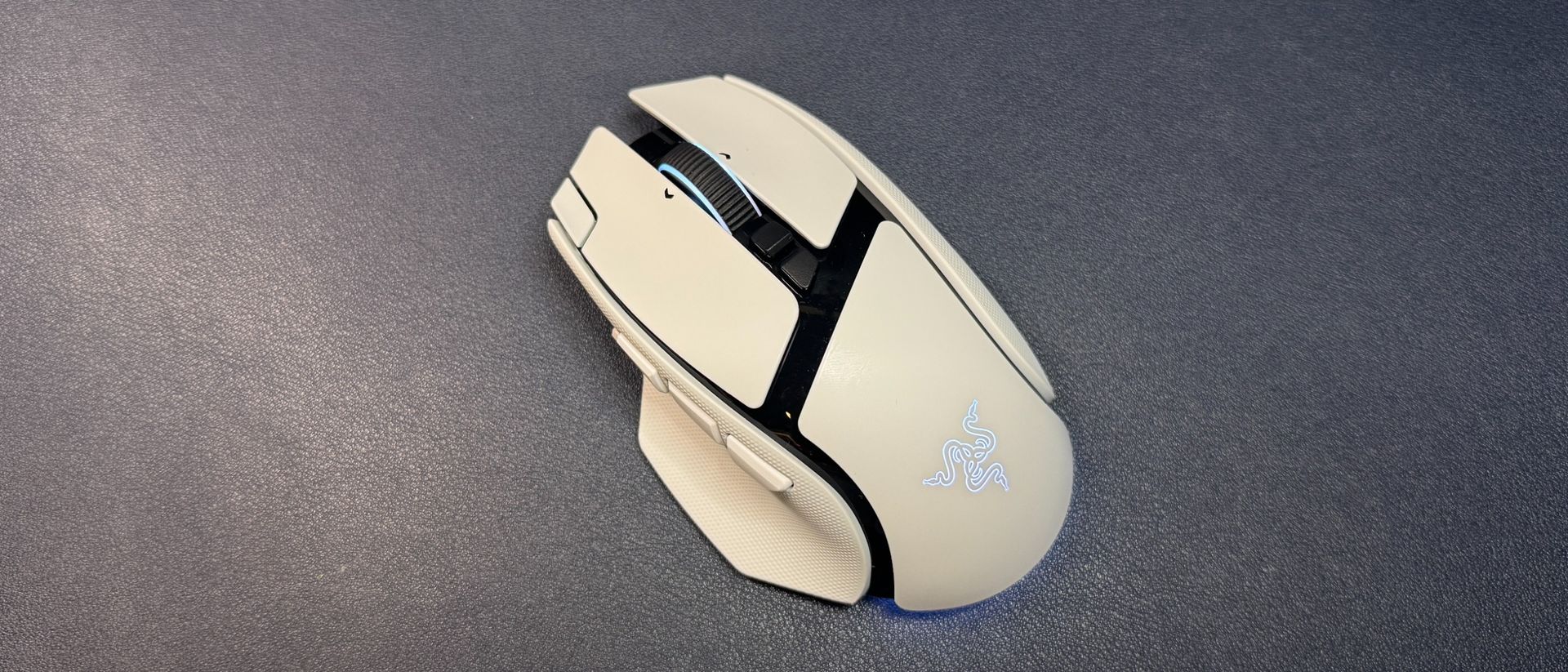
Executive Summary & Market Positioning
Razer has systematically refreshed its peripheral portfolio over the past two years, and the versatile Basilisk line is finally receiving a substantive generational update. Historically positioned as an all-rounder alternative to razor-focused esports peripherals, the Basilisk family prioritizes multi-genre adaptability over featherlight minimalism. The Basilisk V4 Pro retains the familiar, contoured right-handed chassis of its predecessors while introducing targeted architectural iterations, including cutting-edge optical switches, an upgraded high-resolution sensor, and—controversially—dedicated AI prompt mapping. However, this feature-rich paradigm comes at a notable financial cost, launching at a premium tier of $169.99 for the standalone peripheral, with the necessary Mouse Dock V2 Pro sold separately for an additional $69.99.
Positioned squarely against elite multi-purpose wireless mice like the Logitech G502 series, the Basilisk V4 Pro attempts to bridge the gap between high-performance gaming telemetry and productivity-enhancing macros. By balancing up to an 8,000 Hz polling rate with triple-mode connectivity, Razer aims to capture power users and enthusiast gamers who demand robust software ecosystems and extended feature sets. Yet, the inclusion of speculative hardware additions—such as a dedicated AI trigger—forces a critical examination of whether these design choices genuinely optimize the user workflow or simply pander to current industry buzzwords.
Core Architectural & Technological Innovations
At the heart of the Basilisk V4 Pro is Razer’s state-of-the-art Focus Pro 50K optical sensor, paired with Gen-4 optical mouse switches engineered to eliminate mechanical debounce delay while maximizing actuation durability. This hardware stack enables an aggressive 8,000 Hz polling rate when paired with compatible wireless receivers, delivering ultra-low input latency and microscopic motion tracking precision across varying surface materials. The tactile feedback is crisp, avoiding the spongy actuation sometimes associated with multi-button mice, ensuring that every click registers with deterministic reliability.
The peripheral expands its input array to 12 programmable buttons, most notably introducing a third thumb button and an extra macro key positioned ahead of the left primary click. The third thumb button defaults to triggering Razer's software-driven AI prompt, while the secondary top-plate key cycles through user profiles. Unfortunately, these architectural additions introduce noticeable ergonomic friction. The top-plate switch is pushed uncomfortably far forward along the 5.02-inch (127.5mm) chassis, making it difficult for average-sized hands to actuate without shifting grip. Similarly, the insertion of a third inline thumb button compromises the physical positioning of standard navigation inputs, disrupting muscle memory.
Empirical Specifications & Benchmark Matrix
| Specification | Razer Basilisk V4 Pro | Market Baseline (Flagship All-Rounder) |
|---|---|---|
| Sensor Model | Focus Pro 50K Optical Sensor | PixArt PAW3395 / Hero 2 |
| Max DPI | 50,000 DPI | 32,000 – 44,000 DPI |
| Max Polling Rate | 8,000 Hz (Wireless) | 1,000 Hz – 8,000 Hz |
| Switch Type | Gen-4 Optical Mouse Switches | Mechanical / Optical Hybrids |
| Programmable Inputs | 12 Buttons | 8 – 11 Buttons |
| Weight | 100g (Black) / ~100g (White) | 105g – 115g |
| Battery Life | Up to 200 Hours (1,000 Hz) | 90 – 140 Hours |
| MSRP | $169.99 (Dock Sold Separately) | $149.99 – $159.99 (Dock Included) |
Thermal, Efficiency & Real-World Ergonomics
Despite housing an advanced telemetry suite capable of sustained 8,000 Hz polling, power management efficiency remains impressive. The Basilisk V4 Pro delivers up to 200 hours of continuous operation over a standard 2.4GHz connection at 1,000 Hz, mitigating the frequent charging demands typically associated with high-polling peripherals. Physical mass has also been optimized: the black variant scales in at 3.53 ounces (100g), shedding nearly half an ounce compared to the preceding V3 Pro 35K. While far from an ultralight esports mouse, this mass reduction noticeably improves glide dynamics and reduces wrist fatigue during extended productivity sessions.
Ergonomically, the chassis is a mixed engineering achievement. The right-handed contouring, comprehensive thumb rest, and pure PTFE feet provide a smooth, controlled glide. Dimpled rubber side grips enhance traction, though long-term durability remains a concern as these integrated textures are prone to wear over extensive usage periods, lacking replaceable modular grip tape in the box. The scroll wheel features three distinct tactile modes alongside a free-spin option; however, the mechanism exhibits excessive sensitivity in free-spin, occasionally inducing unwanted back-scrolling during casual navigation. Conversely, the precision-tactile stepped configurations deliver satisfying mechanical feedback.
The Definitive Verdict
The Razer Basilisk V4 Pro is a technically brilliant yet structurally over-engineered peripheral. It boasts elite sensor tracking, exceptionally fast optical switches, and commendable weight reduction for an ergonomic all-rounder. However, the forced integration of an AI prompt button and a poorly placed secondary top-plate macro switch negatively impact its functional layout. Coupled with a steep $169.99 base price that excludes the mandatory charging dock, it struggles to justify its cost over the refined, mature V3 Pro 35K. For enthusiasts seeking uncompromising multi-genre performance, the Basilisk V4 Pro delivers top-tier telemetry, but its awkward button placement and premium pricing make it a conditional recommendation.