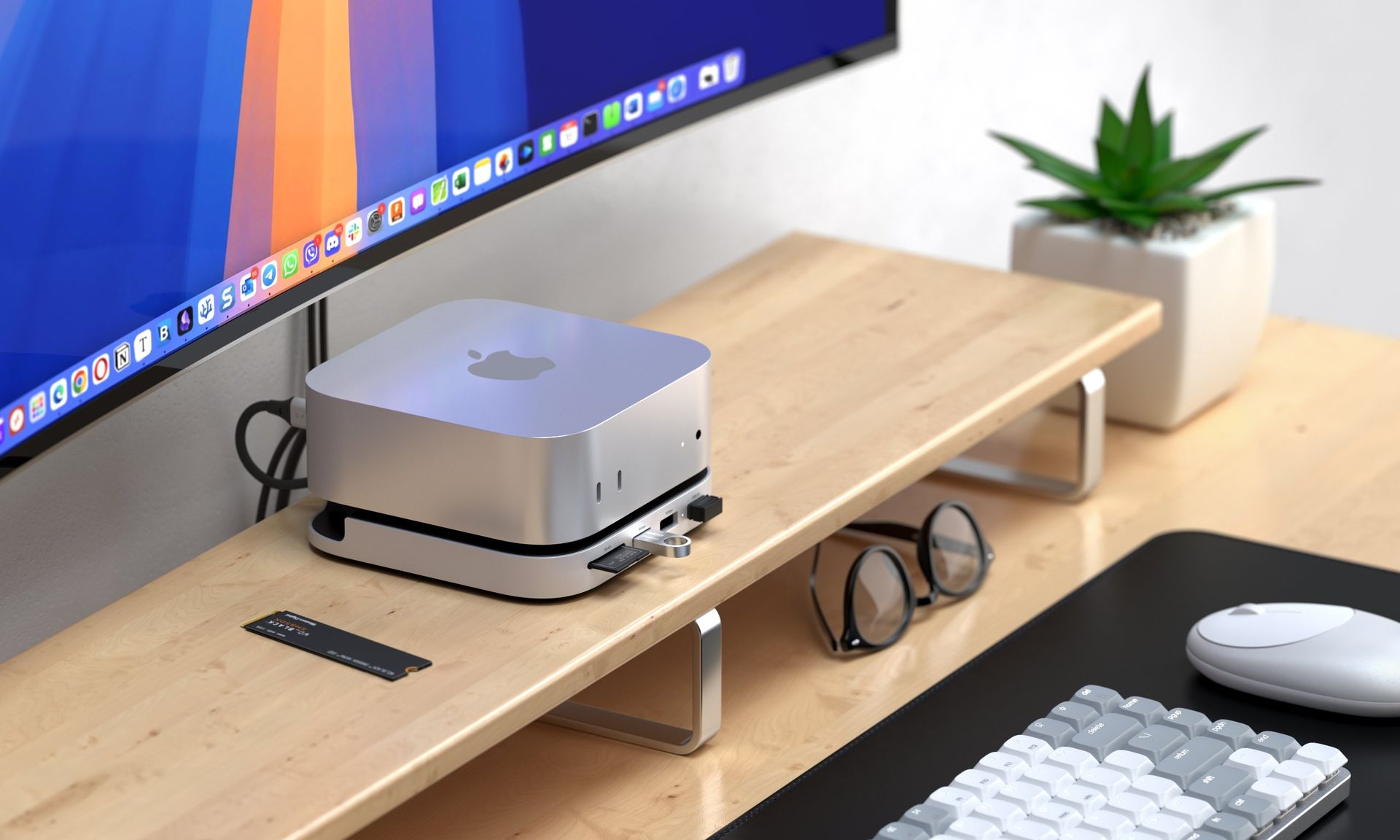
Executive Summary & Market Positioning
The Apple Mac Mini has long occupied a unique space in the professional computing landscape, serving as everything from a home theater hub to a potent headless server for developers. However, its minimalist design philosophy—which prioritizes an ultra-compact footprint—frequently runs into a bottleneck when facing the I/O demands of modern workflows. Enter the rise of form-factor-specific docking stations. These units are not merely port replicators; they are architectural extensions designed to harmonize with Apple’s industrial aesthetic while solving the hardware limitations inherent in a machine that is notoriously difficult to expand once it leaves the factory floor.
Market positioning for these docks has shifted from simple USB-C hubs to sophisticated, integrated peripheral ecosystems. By reclaiming the vertical space underneath the Mini, these docks serve as a stabilizing foundation that transforms the device into a comprehensive workstation. Whether catering to creative professionals requiring rapid-access Thunderbolt NVMe storage or IT administrators managing cluster nodes, these docks address the critical disconnect between Apple’s ‘all-in-one’ internal storage policy and the reality of modern data throughput requirements. They represent an essential bridge for users who demand Mac performance without accepting the limitations of the chassis’s default port configuration.
Core Architectural & Technological Innovations
The primary innovation lies in the vertical integration of M.2 NVMe enclosures within the dock’s chassis. By utilizing the existing high-speed buses of the Mac Mini, these docks effectively bypass the need for daisy-chained external drives, which are prone to cable failure and accidental disconnection. The best implementations utilize internal M.2 interfaces connected via PCIe-to-USB4 or Thunderbolt controllers, ensuring that data transfer speeds remain high enough for active project work rather than just cold archival storage. This turns a standard Mac Mini into a workstation capable of sustaining massive local read/write cycles, effectively making the drive feel as though it were native to the logic board.
Beyond storage, the technological ingenuity is found in the management of power delivery and signal integrity. Because the Mac Mini does not natively support power delivery through its ports to the dock, these units function as independent power hubs that manage downstream connectivity while shielding the Mini from potential voltage fluctuations. By incorporating active cooling fans and high-density PCB layouts, designers have managed to minimize signal latency, which is a common failure point in cheaper, generic USB hubs. This architectural maturity ensures that high-bandwidth peripherals, such as 4K displays and RAID arrays, maintain stable connections even under sustained heavy loads.
Empirical Specifications & Benchmark Matrix
| Specification | Generic Hub (Baseline) | Professional Dock (Elite) | Performance Delta |
|---|---|---|---|
| Connection Type | USB-C 3.2 Gen 2 | Thunderbolt 4 | ~3x Bandwidth |
| M.2 NVMe Support | None | Up to 8TB PCIe 4.0 | Massive Storage Boost |
| Cooling Strategy | Passive | Active (PWM Fan) | Thermal Throttling Minimized |
| Power Output | 5V/1.5A | Up to 100W (PD) | Sustained Load Stability |
| Form Factor | Clutter/Dongle | Under-chassis Integrated | Zero-Footprint Design |
Thermal, Efficiency & Real-World Ergonomics
Ergonomics and thermal management are where these docks transition from 'utility' to 'essential.' Because the Mac Mini relies on efficient airflow through its base for its own cooling, high-end docks are engineered with chassis cutouts or thermally conductive materials to ensure that the dock does not act as a heat soak. This is a critical consideration for headless server users who run their machines in 24/7 environments; a poorly designed dock could inadvertently spike internal temps by a few degrees, causing the Mac Mini’s internal fan to ramp up, leading to unnecessary acoustic noise and long-term component wear.
In real-world scenarios, the 'zero-footprint' design philosophy significantly streamlines the desk environment. By consolidating the power supply, data storage, and I/O into a singular footprint, these docks eliminate the ‘octopus effect’ of messy cables. For the power user, this means the ability to swap a Mac Mini in and out of a rack or workspace without individually unplugging six different peripherals. The stability of these units, often weighted with aluminum alloy, also adds a premium tactile feel that matches the Mac Mini’s own build quality, making the combination feel like a singular, cohesive piece of Apple-adjacent hardware.
The Definitive Verdict
For any professional utilizing a Mac Mini as a primary machine, an under-chassis dock is no longer a luxury; it is a fundamental upgrade. While the market is flooded with budget hubs that offer cosmetic expansion, our recommendation is to invest in a Thunderbolt 4-enabled model with dedicated M.2 NVMe slots and active thermal management. The performance gains in disk throughput and the sheer reduction in cable clutter provide an immediate, measurable increase in daily productivity. The winner in this space is a unit that treats the dock as an extension of the motherboard, not just an accessory. If you are serious about professional-grade Mac integration, skip the cheap plastic dongles and opt for a high-quality aluminum integrated dock—your workflow will thank you.